Wallet Marketplace
Filter wallets, select up to 100 at once, compare costs and follow checkout.
Marketplace sells ready-made funded and aged wallets. Delivered wallets join your global wallet pool. Pick a category first: Funded Solana, Aged Solana, Aged Robinhood, Solana dev or Robinhood dev.
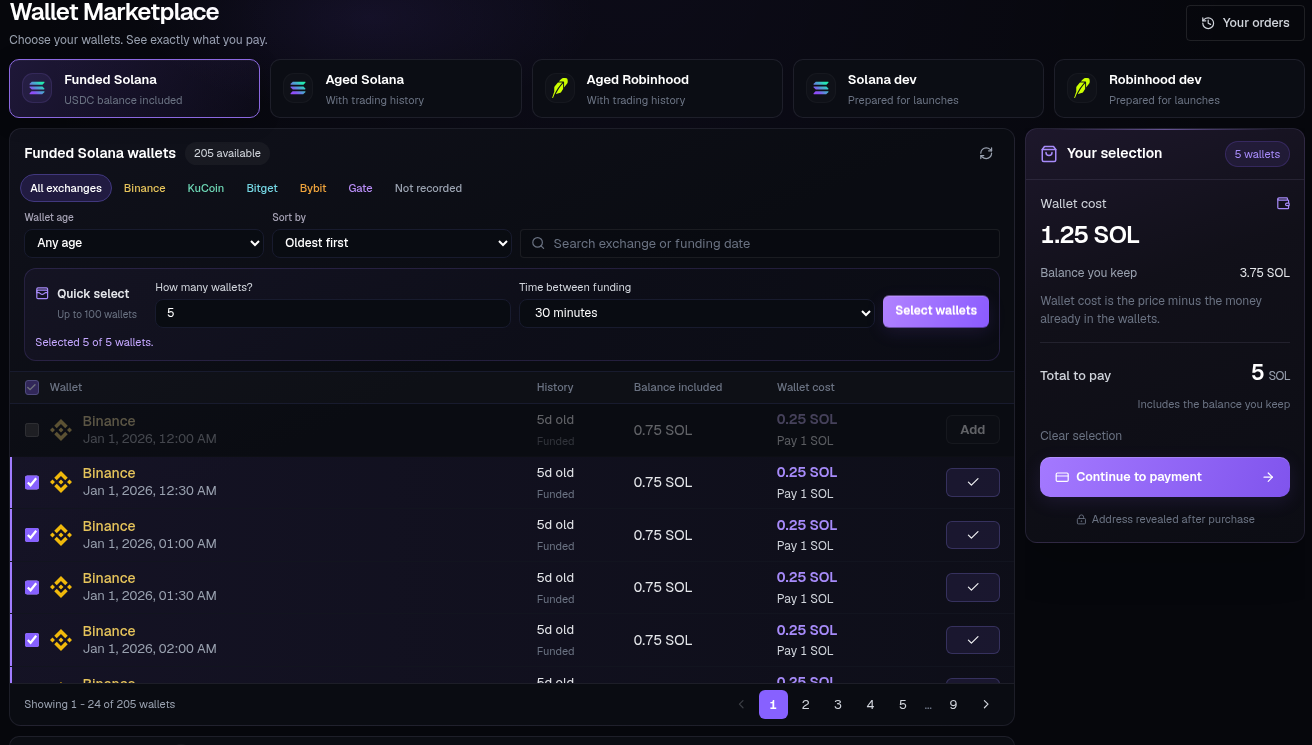
Find wallets#
Filter by funding exchange, Wallet age and Funding order, or search by exchange or funding date. Aged wallets also offer Trader type and Region. Reset filters clears the filters.
Each row shows funding history, the balance included and the Wallet cost. Addresses stay private until purchase.
Quick select#
Choose How many wallets? and Time between funding, then press Select wallets. Quick select uses your filters across catalog pages and supports up to 100 wallets.
Funding gaps range from 30 minutes to 6 hours. The selected wallets must meet that gap; the result tells you if fewer matching wallets are available. You can also select individual rows or Select page. Rows too close to an existing selection are unavailable. If a changed gap makes the selection invalid, select again or adjust the gap before checkout.
Understand the total#
The selection summary separates the balance you keep from the wallet cost. Total to pay includes both. Where included USDC is valued in native coin, the cost estimate uses the current exchange rate.
On desktop the selection summary sits beside the catalog. On mobile the checkout summary stays at the bottom when wallets are selected.
Pay and receive#
Press Continue to payment to reserve the selection and open checkout. Send the Exact amount to send to the displayed Payment address, on the chain shown. Checkout checks payment automatically.
You can close checkout and use Your orders or Resume payment to return. When delivery completes, choose Open Wallets. Notifications also links marketplace updates to their order.
The countdown is your reservation window. If you paid but the order expired, use Check late payment or Open Support before paying again.