Groups
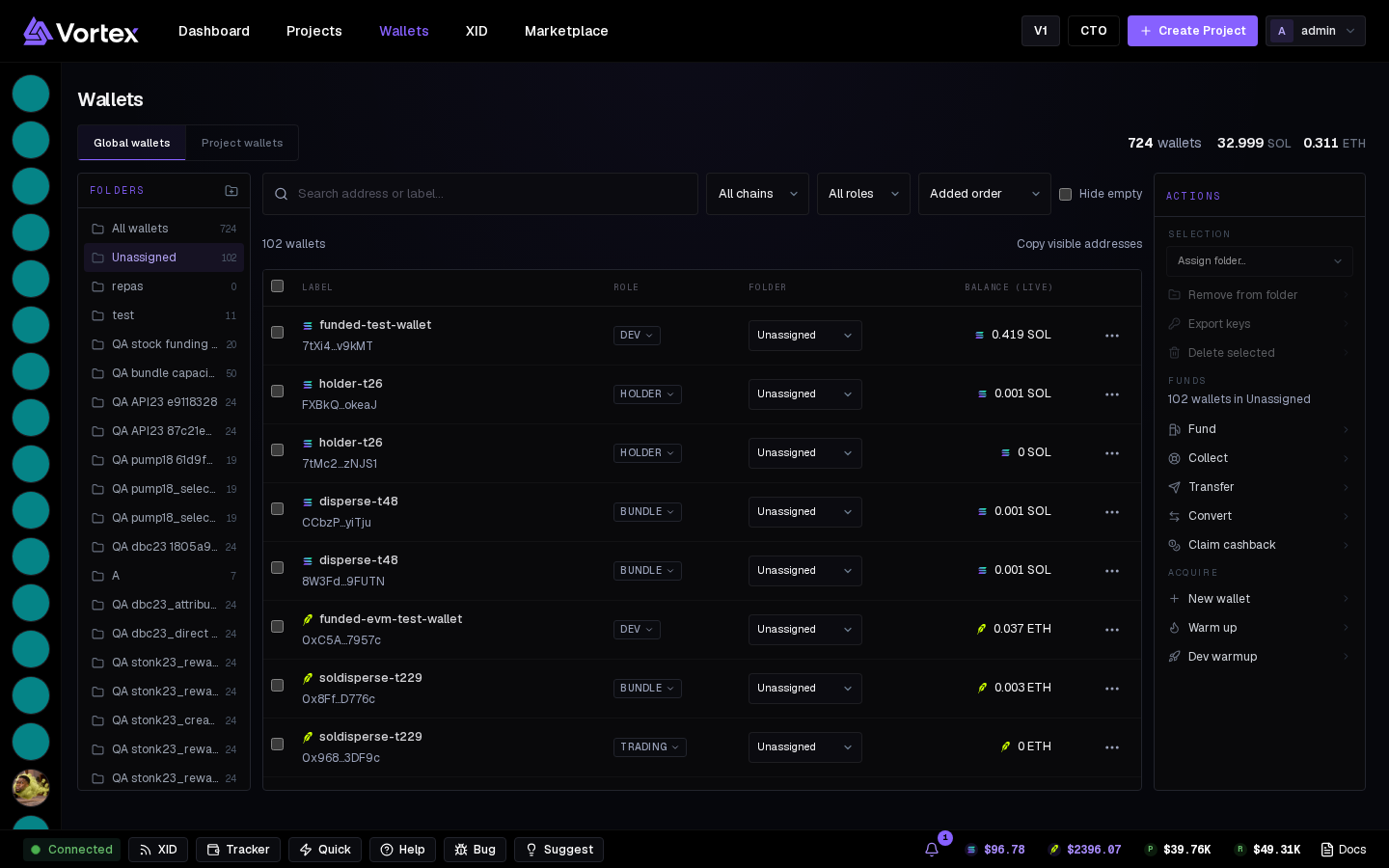
Folders on the Wallets page — file wallets, filter, act on a folder at once.
Folders (the left column of the Wallets page) keep a big pool readable. A wallet is in at most one folder; the rest are Unassigned. Folders are per account and span both chains.
Working with folders#
- New folder — the plus next to the Folders heading.
- Rename / Delete — hover a folder row. Deleting keeps the wallets; they go back to Unassigned.
- All wallets and Unassigned are fixed rows with live counts.
Filing wallets#
- Select rows and file them via the folder picker, or Remove from folder to send them back to Unassigned.
- A folder filter narrows the table, stat tiles and every action modal (Fund, Collect, Warm up) to that folder.
Folders vs projects#
A folder is a label for you; a project is a launch whose wallets its tasks trade from. A wallet can be in a folder and in several projects at once. Folders = "the June sniper set"; projects = "the token I launched today".
Copy a folder
With a folder selected, Copy above the table copies every address in it, one per line.