Volume
A continuing loop of organic-looking buys and sells across your wallets.
Volume prints trades across your wallets to keep a chart alive. Volume style picks how, and can't be changed after the task is created:
- Scheduled — a plan of buys or sells in one direction, from a second apart.
- Mixed — buys and sells together, as fast as 10+ trades a second, until you stop it or a limit ends it. The rest of this page is the Mixed style.
Volume always trades live — it has no rehearsal mode.
Buys and sells#
Buy power / Sell power are relative weights: 100/0 only buys, 50/50 is even, 70/30 leans long. At least one must be above zero. A sell takes between Min sell and Max sell percent of the wallet's bag.
Two guards keep the feed from reading as one-way:
- Max same side in a row — after that many buys (or sells) in a row the next trade goes the other way. 0 turns it off.
- Net-buy cap — while the run has this much SOL tied up in tokens it hasn't sold back yet, it only sells. 0 turns it off. Buys still on their way count, so a fast run can't overshoot it. It reads what the run still holds, not buys minus sells: fees and slippage make every round trip cost a little, and that alone would pin a long run at the cap while it held nothing.
Sizing#
- Random size in a band — each buy between Min buy and Max buy.
- Reach a volume target — Target volume within Within minutes: sizes are recomputed each tick from what's landed, so it catches up when behind and stops on target. Size jitter (Advanced) varies sizes so ticks don't look alike.
Pacing and limits#
- Min delay / Max delay — the gap between sending trades (from 20 ms), not between confirmations.
- Trades at once — how many trades may be on their way together. A wallet only ever has one trade out, so the real ceiling is your wallet count. At 1 the run is one-at-a-time, about 2–4 trades a second at best.
- Maximum trades — 0 runs until stopped.
- Min SOL reserve — buys that would breach it are clamped or skipped.
- Max supply per wallet — skips wallets at the ceiling.
- Max consecutive errors.
Going fast#
For 10+ trades a second: Min delay and Max delay around 50–100 ms, Trades at once 10 or more, and at least as many wallets as that.
Every trade pays the network fee, the send tip and the platform fee. Ten trades a second is 600 paid trades a minute — set Maximum trades or a volume target before you start a fast run.
Look like trading bots#
Pick any of Photon, Trojan, BullX, Axiom: every trade then also sends 10 lamports (0.00000001 SOL) to that bot's fee wallet, the same transfer those bots make, so explorers and wallet trackers label the trade as made through the bot. Each wallet sticks to one of the bots you picked. Pick none to turn it off. Solana only.
If Sell through a temporary wallet is on for this task, those sells are signed by a throwaway wallet that trades once — tagging it would label that wallet, not your trader — so they go out untagged. The task's preview tells you how many of its wallets sell that way.
Volume rotates through every task wallet — a handful of wallets makes the feed show many traders. Pair with Hand Switcher to actually move supply between hands.
volume- Volume stylechoicedefault Scheduled — one side, fixed intervalScheduled trades one side on a fixed interval. Mixed picks a side, a wallet and a size at random every trade, and can keep several trades in flight at once. The style cannot be changed after the task is created.Scheduled — one side, fixed intervalMixed — fast random buys and sells
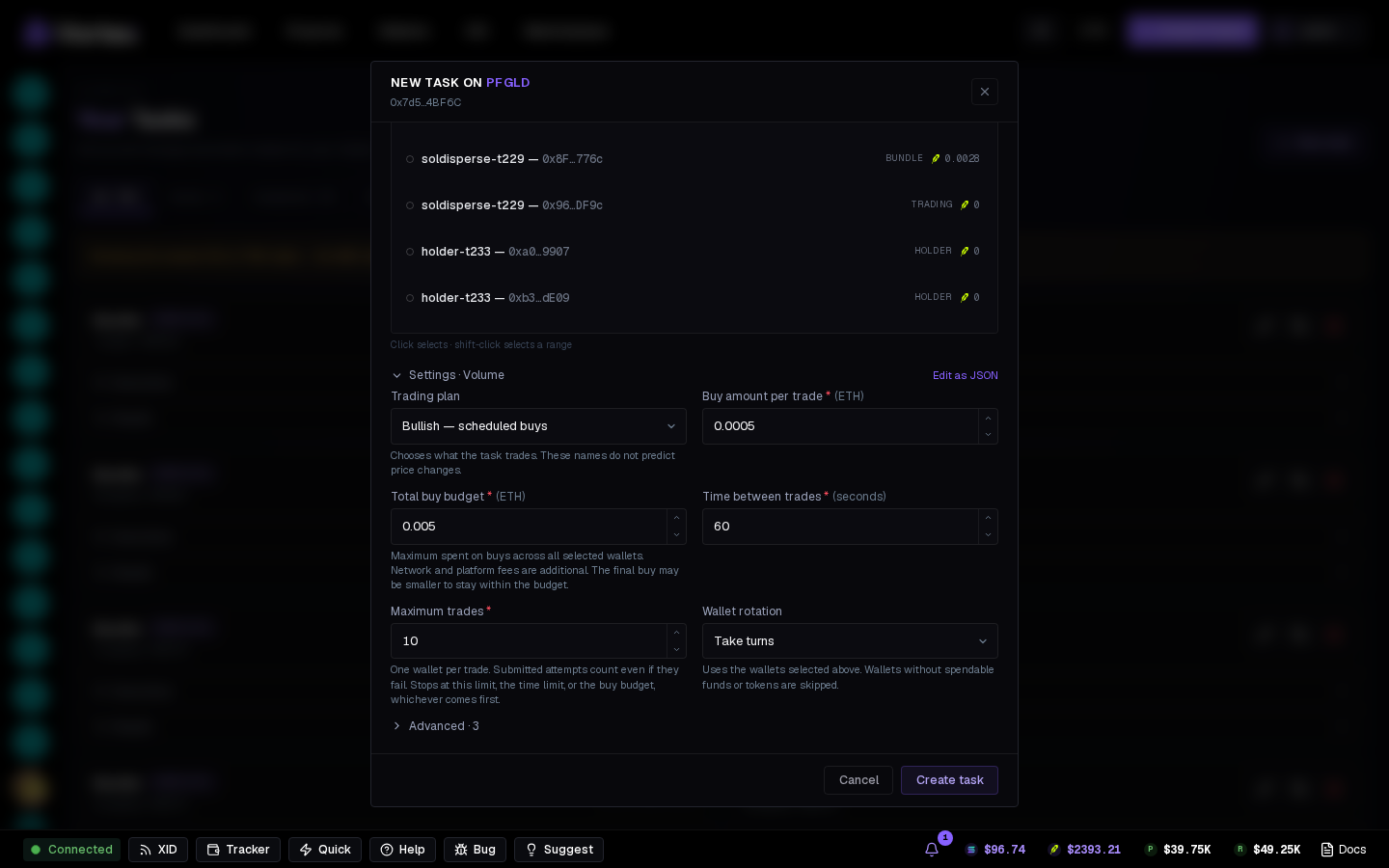
- Trading planchoicedefault Bullish — scheduled buysChooses what the task trades. These names do not predict price changes.Bullish — scheduled buysBearish — scheduled sells
- Buy amount per tradenumberrequireddefault 0.01 SOL
- Total buy budgetnumberrequireddefault 0.1 SOLMaximum spent on buys across all selected wallets. Network and platform fees are additional. The final buy may be smaller to stay within the budget.
- Tokens to sell per tradenumberrequireddefault 10 %0.01–100 %Percentage of the chosen wallet’s remaining tokens, each time. Empty wallets are skipped; this plan never buys.
- Time between tradesnumberrequireddefault 60 seconds1–86400 seconds
- Maximum tradesnumberrequireddefault 101–10000One wallet per trade. Submitted attempts count even if they fail. Stops at this limit, the time limit, or the buy budget, whichever comes first.
- Wallet rotationchoicedefault Take turnsUses the wallets selected above. Wallets without spendable funds or tokens are skipped.Take turnsChoose an eligible wallet randomly
- Stop afternumberrequireddefault 60 minutes1–10080 minutesTime limit each time the task starts or resumes. The trade count and buy budget continue from the saved progress.
- Buy powernumberdefault 50Relative weight of buys vs sells: 50 / 50 is even, 70 / 30 leans long, 100 / 0 only buys. At least one must be above 0.
- Sell powernumberdefault 50
- Most trades on one side in a rownumberdefault 3After this many buys in a row the next trade is a sell, and the other way round, so the feed never shows a one-way run. 0 = off.
- Net-buy capnumberdefault 0 SOLThe most the run may be net long (bought minus sold). At the cap every trade is a sell until it is back under, so the chart stays level and the wallets keep their SOL. 0 = off.
- Buy sizingchoicedefault Random size in a bandTarget: every buy is sized from what is still missing over the fires the window allows — re-sized from the ledger each tick, so it catches up when behind and stops on the target.Random size in a bandReach a volume target in a window
- Min buynumberdefault 0.01 SOL
- Max buynumberdefault 0.1 SOL
- Target volumenumberdefault 1 SOLPrinted volume to reach: buys count what they spend, sells what they bring back.
- Withinnumberdefault 30 minThe run ends when the target is printed or the window closes, whichever comes first.
- Size jitternumberdefault 30 %0–90 %Each sized buy swings ± this much so the ticks do not all look alike.
- Min sellnumberdefault 10 %0.01–100 %A sell takes a random share of the chosen wallet’s tokens between Min sell and Max sell.
- Max sellnumberdefault 50 %0.01–100 %
- Shortest wait between tradesnumberdefault 1000 msThe wait before the NEXT trade is sent — not until the last one lands. For 10+ trades a second: waits of 50–100 ms, 10 or more trades at once, and at least that many wallets.
- Longest wait between tradesnumberdefault 5000 ms
- Trades at oncenumberdefault 11–50How many trades may be on their way at the same time, each from a different wallet (a wallet never carries two). 1 = one at a time. Every trade pays its own network and platform fees.
- Slippagenumberdefault 500 bps1–5000 bps
- Min SOL reservenumberdefault 0 SOLKeep at least this much SOL in each wallet (for gas); a buy that would breach it is clamped or skipped. 0 = off.
- Stop after repeated errorsnumberdefault 5
- Look like trading botschoicesdefaultEvery trade also sends 10 lamports (0.00000001 SOL) to the fee wallet of one of the bots you pick, so explorers and trackers label the trade as made through that bot. Each wallet sticks to one bot. Pick none to turn this off.
- Maximum tradesnumberdefault 00 = run until stopped.
- Maximum supply per walletnumberdefault 0 %0–100 %Skip wallets already holding this share of the token supply. 0 = no limit.
- Simulatetoggledefault offCheck the task without sending transactions or spending funds.