Bundle
Up to 24 wallets buy in one atomic Jito bundle — all land in the same slot or none do. Solana only.
Bundle buys from up to 24 wallets in one atomic Jito bundle: every buy lands in the same slot, or none do. It's the Solana launch buyer for the first block. (On Robinhood the Snipe lands in the launch block on its own, so Bundle is Solana only.)
The simple part#
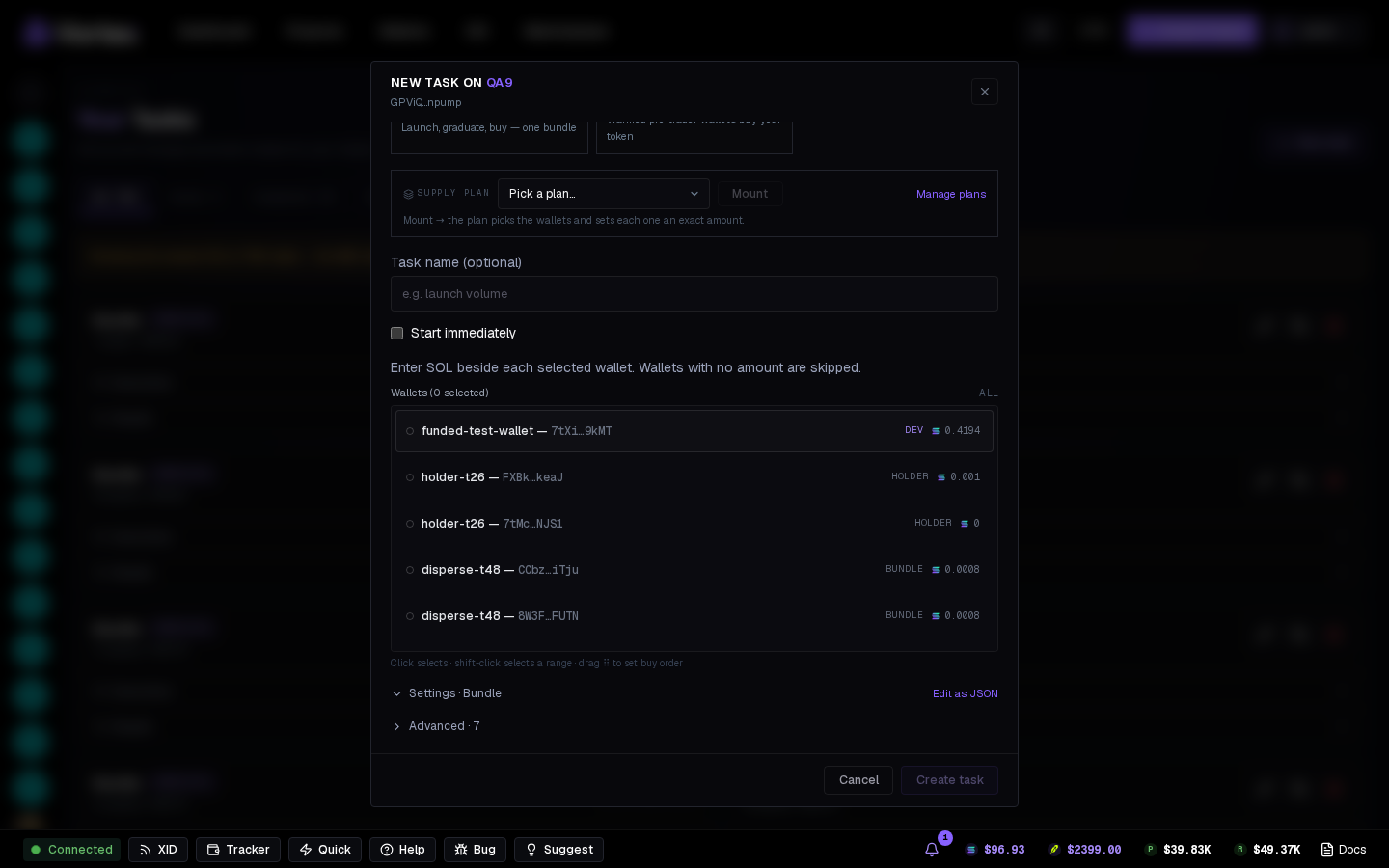
The default form is just Per-wallet SOL (the exact buy of each wallet). Everything else sits under the Advanced fold with automatic defaults. A Bundle on the Tasks page buys for real — there's no Simulate. A launch simulation shows bundle packing, but cannot simulate wallet buys before the mint exists.
Lookup tables (automatic)#
There is no lookup-table setting — a status box under the wallet list handles it:
- Up to 10 wallets — fits on the platform table, nothing to set up.
- More — the box attaches your best existing table, or offers Create lookup table (rent ≈ 0.04 SOL, returned when you close it).
- Add wallets later and it offers Extend lookup table. Tip: create/extend once, when you've finished picking wallets — cheapest.
- The table is paid by the first selected wallet that can afford the rent.
How many wallets fit per bundle:
| Setup | Live token | At launch |
|---|---|---|
| No table | 5 | 4 |
| Platform table | 10 | 8 |
| Your own table | 15 (20 live, 24 with pre-made token accounts) | 8 |
First-time buys (the wallet's token account is created inside the buy) are heavy: at most 2 share a transaction, so an all-first-time bundle fits 10 even with your own table. The status box words every cap as "up to X — fewer if the wallets have never bought this token".
Modes#
- Buy (creates ATAs) — token accounts are created inside the buy (default).
- Pre-create ATAs only — makes them ahead in batches of ATA batch size.
- Buy (ATAs pre-made) — assumes they exist; packs tightest.
Wallets / tx (1–8) caps how many buys share one transaction; a bundle is at most 5 transactions.
At launch#
Add a Bundle with Auto-start in the wizard and, on a SOL-quoted curve, it rides the launch: the create + dev buy is the first transaction of the Jito bundle and your wallets fill the other four — same slot or nothing. No buyer can land between the dev buy and your wallets; if the bundle doesn't land, the token isn't minted.
- The wizard card is the same form: pick wallets, type each one's SOL, or mount a supply plan.
- Simulate shows the packing; the buys themselves can't be simulated before the mint exists.
- Create sends the bundle for real. Check the launch result for whether it landed.
Curves quoted in a stock or USDC: right before launch, each wallet swaps the SOL it needs into the quote through Jupiter (what it already holds counts first). If the launch doesn't land, every wallet is swapped back to SOL. A wallet short on SOL is dropped with the reason — it never stops the bundle; the launch is refused only when no wallet is left.
USD1 LaunchLab curves start at the mint instead (reserves can't be priced before the token exists) — create your table before launch so the bundle fires the instant the token lands.
Advanced#
- Jito tip — what the bundle pays to land, in lamports.
- Fire if already live — buy anyway if the token is already trading when the task starts.
- Max wait — how long to wait for the launch; 0 = no limit.
- Confirm timeout, Slippage, Pre-swap slippage (stock/USDC curves only).
A launch's Simulate builds and checks every transaction, catching sizing and account errors. Whether a live bundle lands still depends on the tip and the slot.
bundle- Per-wallet SOLper-wallet amountrequiredOne atomic bundle. Wallet and lookup-table capacity is checked for the selected token before execution.
- Lookup tablelookup tableoptional
- Wallets / txnumberdefault 51–8Automatically packed within transaction size and runtime limits.
- Modechoicedefault Buy and set up token accountsBuy and set up token accountsSet up token accounts onlyBuy (ATAs pre-made)
- Token accounts per transactionnumberdefault 81–12
- Jito tipnumberdefault 1000000 lamports
- Slippagenumberdefault 500 bps1–5000 bps
- Pre-swap slippagenumberdefault 100 bps1–5000 bpsOnly on a curve quoted in a stock or USDC: each wallet's SOL amount is swapped to that asset through Jupiter right before the bundle (what a wallet already holds is spent first). If the bundle does not go through, the swapped asset goes back to SOL at this slippage.
- Fire if already livetoggledefault on
- Max waitnumberdefault 0 s
- Confirmation time limitnumberdefault 30000 ms1000–120000 ms
- Simulatetoggledefault offCheck the task without sending transactions or spending funds.