Limit order
Fire one buy or sell when the market cap crosses a level.
A Limit order waits for the market cap to cross a level, fires once from the task's wallets, and ends. Sell above = take-profit, sell below = stop-loss, buy below = accumulate, buy above = breakout chase. Stack several into a Ladder.
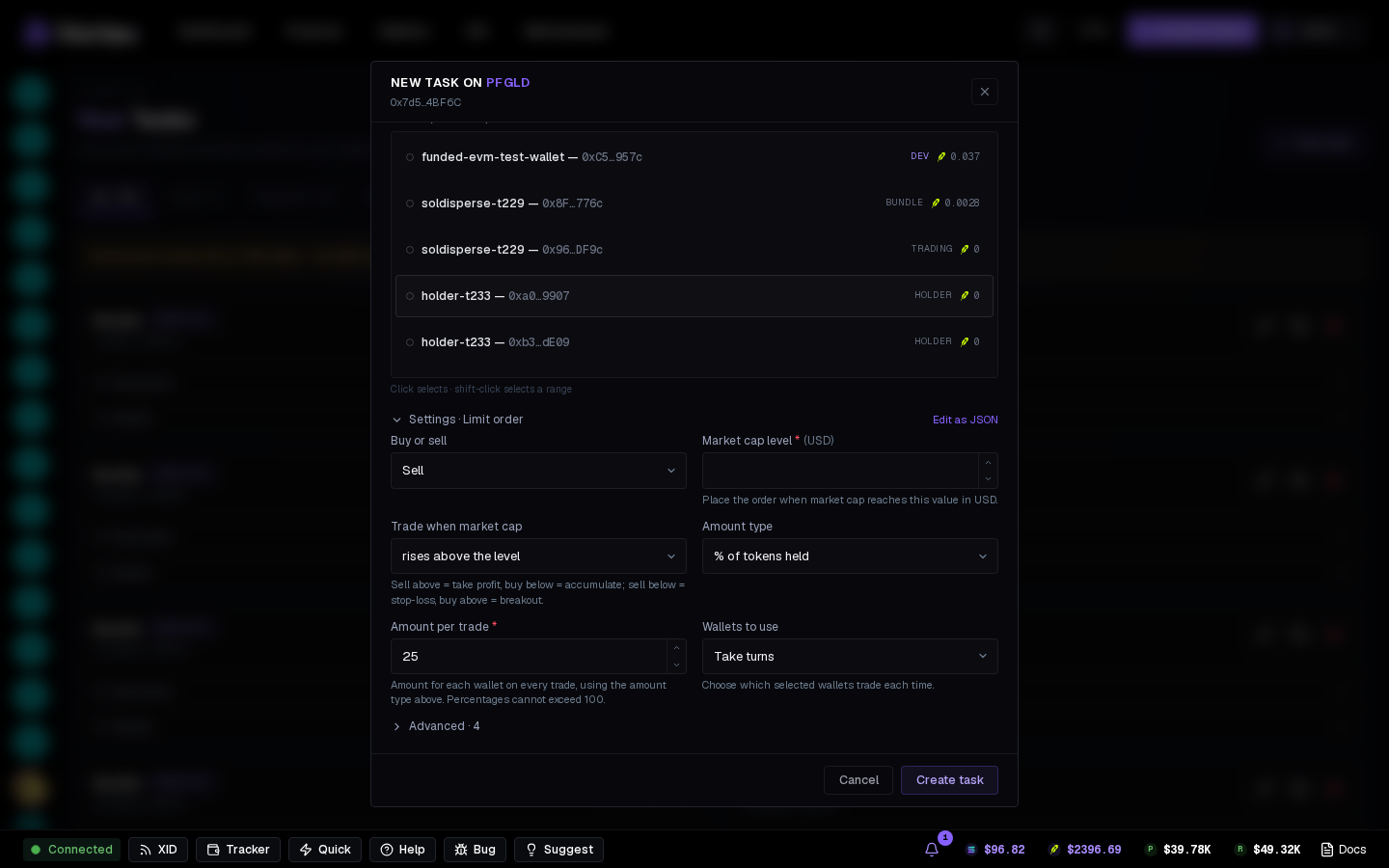
New orders default to All wallets. The order uses the current wallets in this token's project, or your global pool for a task outside a project, on the token's chain when it triggers. Wallets added later are included automatically. Select By role to use all wallets carrying one of the chosen roles, including later additions and role changes. Neither option needs individual wallet selections. Choose wallets keeps a fixed selection.
Sells skip wallets with no tokens.
The rule#
- Side — Buy or Sell.
- Market cap level (USD) and whether it fires above or below.
- Size + Size unit — per wallet, per fire: coin, % of wallet balance, % of tokens held or % of supply.
- Wallets to use — with a custom selection, use Every wallet (default), Take turns, Random, Biggest/Smallest holder, or Richest.
Timing#
- Start delay (Advanced) — wait before the order may fire.
- Lifetime (Advanced) — ends this long after the start delay; empty = until it fires.
- Max supply per wallet, Slippage.
A Limit order trades for real — there's no Simulate. Size it small the first time.
Reading the card#
The Orders section shows the order's state: Waiting → Fired → Ended, with the live market cap in the header.
Levels are in USD market cap — what the chart and every launchpad show. The app converts with the live coin price at each check.
limit_order- Wallet sourcechoicedefault Choose walletsChoose walletsAll walletsBy role
- Wallet roleschoicesoptional
- Buy or sellchoicedefault SellBuySell
- Market cap levelnumberrequiredPlace the order when market cap reaches this value in USD.
- Trade when market capchoicedefault rises above the levelSell above = take profit, buy below = accumulate; sell below = stop-loss, buy above = breakout.rises above the levelfalls below the level
- Amount typechoicedefault SOL per walletSOL per wallet% of wallet balance
- Amount per tradenumberrequireddefault 0.1Amount for each wallet on every trade, using the amount type above. Percentages cannot exceed 100.
- Wallets to usechoicedefault Every walletChoose which selected wallets trade each time.Take turnsRandom walletBiggest holderSmallest holderRichest walletEvery wallet
- Start delaynumberdefault 0 msWait this long before the first trade.
- Run fornumberoptionalEnd this long after the start delay; empty = until done.
- Max supply per walletnumberdefault 0 %0–100 %Hard ceiling: a wallet already holding this % of supply is skipped instead of buying more. 0 = off.
- Slippagenumberdefault 500 bps1–5000 bps
- Simulatetoggledefault offCheck the task without sending transactions or spending funds.