The terminal
One screen per token: chart, trades, your wallets' positions and the tasks on it — in two layouts.
Every token gets a terminal: live chart, trades feed, your wallets with inline buy and sell buttons, and the tasks on that token, on one screen. It opens automatically at launch, from a project card's Open terminal, the left rail, or /swap?mint=….
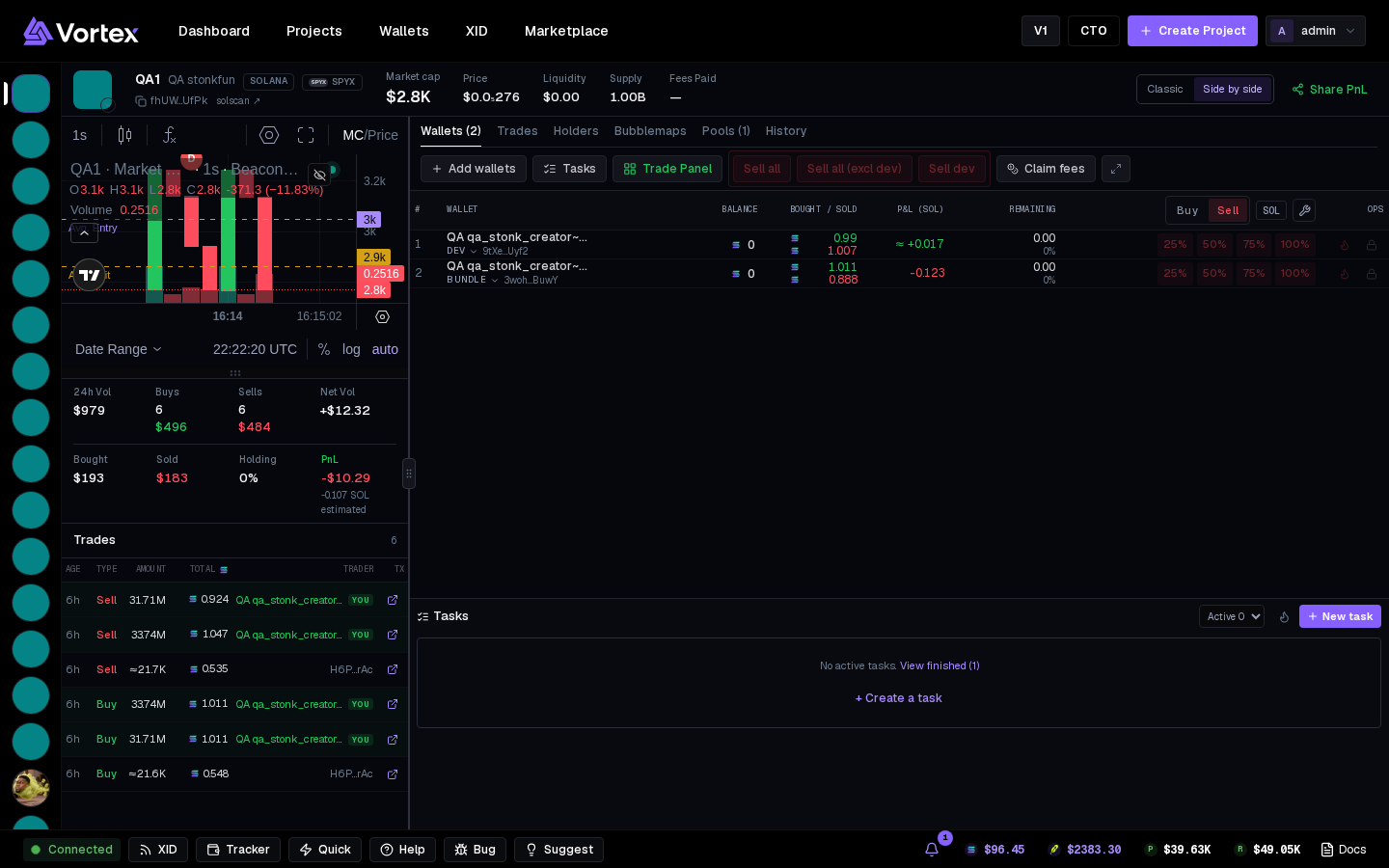
Layouts#
The switch in the header picks how the screen is split. The terminal remembers your choice.
- Side by side — chart, market stats and the Trades feed in a resizable column; your wallets beside it, the Tasks rail under them.
- Classic — a compact chart with the Trades feed beside it, your wallets below, and the stats and Tasks rail in a column on the right.
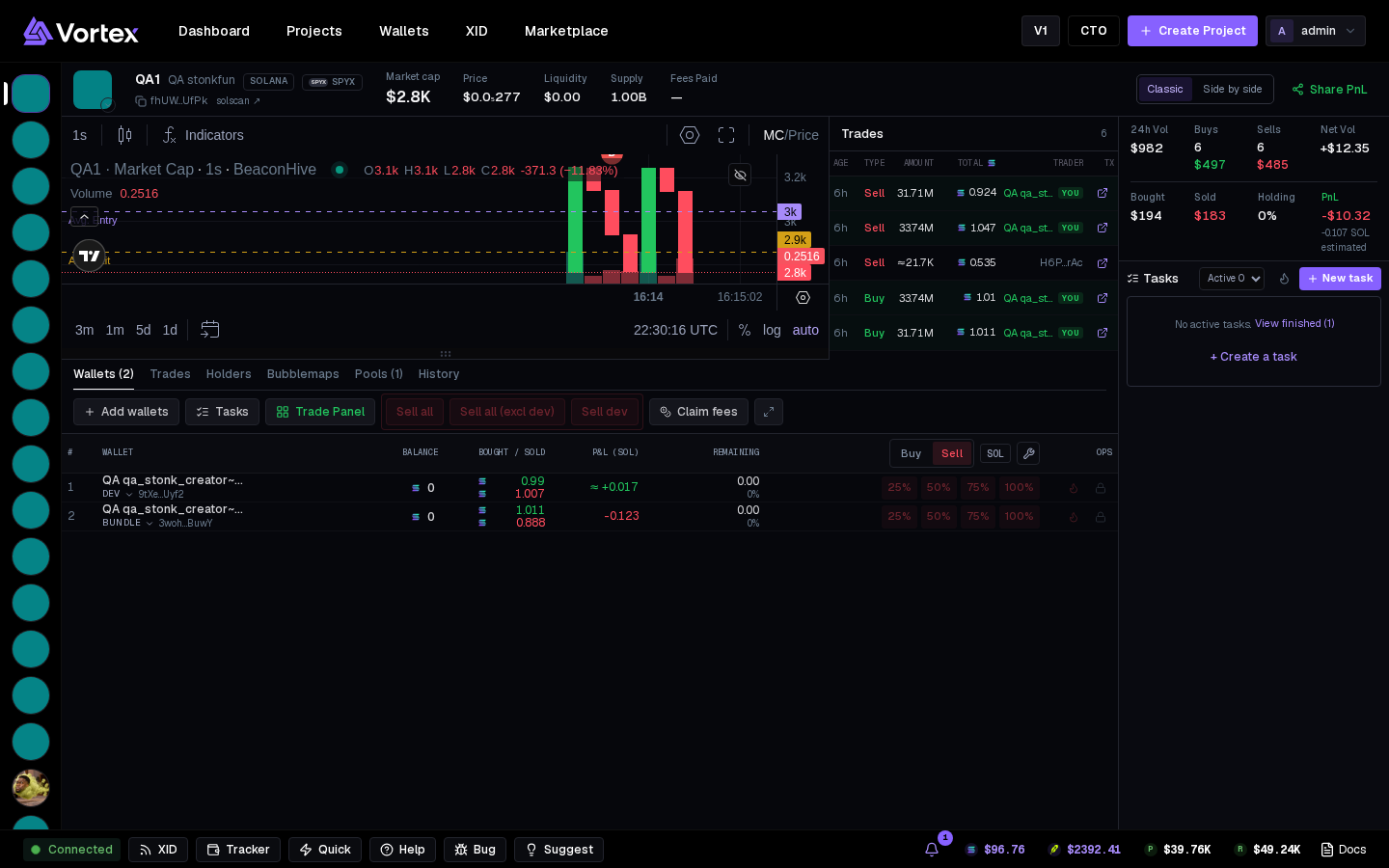
Header#
Symbol, name, chain and quote badges, contract address (click to copy), explorer link. Live figures: Market cap, Price, Liquidity, Supply, Fees Paid. On the right: the layout switch and Share PnL (see P&L share cards).
Chart and stats#
The app's own candles from the on-chain feed — shows a token from its first trade, before any explorer indexes it. Your fills and KOL tracker wallets' trades are marked on it.
- Market: 24h Vol, Buys, Sells, Net Vol.
- Yours: Bought, Sold, Holding, PnL — open bags valued at what selling them now would return, with the coin estimate under it.
Tabs#
- Wallets (n) — your wallets on this token, with inline trading (below). Opens by default.
- Trades — every swap as it lands, with its transaction link. Your wallets carry a YOU tag; tracked KOLs their emoji.
- Holders — current holders, largest first, with % supply. YOU and dev tags included; a donut splits supply into Dev / Yours / Top 10 / Other / Pool.
- Bubblemaps — the holder-cluster map, embedded; spot one person behind many wallets.
- Pools (n) — DEX, pool address and reserves behind the price.
- History — your fills only, with transaction links.
The tab bar#
- Add wallets — attach pool wallets to this token (your own launches).
- Tasks — shows the Tasks rail again.
- Trade Panel — one buy or sell across many wallets, see Trade panel.
- Sell all, Sell all (excl dev), Sell dev — see Sell all.
- Claim fees — claim the creator fees your launch has earned. On a coin with pump.fun Holder Rewards the button reads Holder Rewards: they're paid automatically in the quote token. On Robinhood it reads Creator fees and shows the totals — pons sweeps them to the creator wallet by itself.
- Focus wallets (⤢) — the wallet table takes the full width; press again to bring back the chart and stats.
Trading from the wallet table#
Columns: #, Wallet, Balance, Bought / Sold, P&L (SOL), Remaining (tokens left and % of supply), the trade buttons, and Ops.
- Buy / Sell above the buttons picks which set every row shows.
- SOL / % — buy buttons in coin, or in % of each wallet's spendable balance.
- The wrench edits the button amounts.
- Buy rows: preset amounts plus MAX — everything spendable, with the gas reserve and platform fee kept back so the wallet can still sell.
- Sell rows: 25 % · 50 % · 75 % · 100 % of that wallet's bag.
One press is one real swap from that wallet. Double-click a wallet's label to rename it; the role chip changes its role.
Ops: Burn destroys the wallet's tokens (both chains); Lock locks them with Streamflow (Solana). Both need tokens in the wallet.
Tasks rail#
Every task on this token. Active / All switches the list; the flame is Warm up wallets; New task opens the task form pointed at this mint. Click a row to expand it into the full card. With nothing running it says No active tasks., with View finished and + Create a task.
Everything updates by itself. If the footer doesn't say Connected, you're seeing the last received state.